
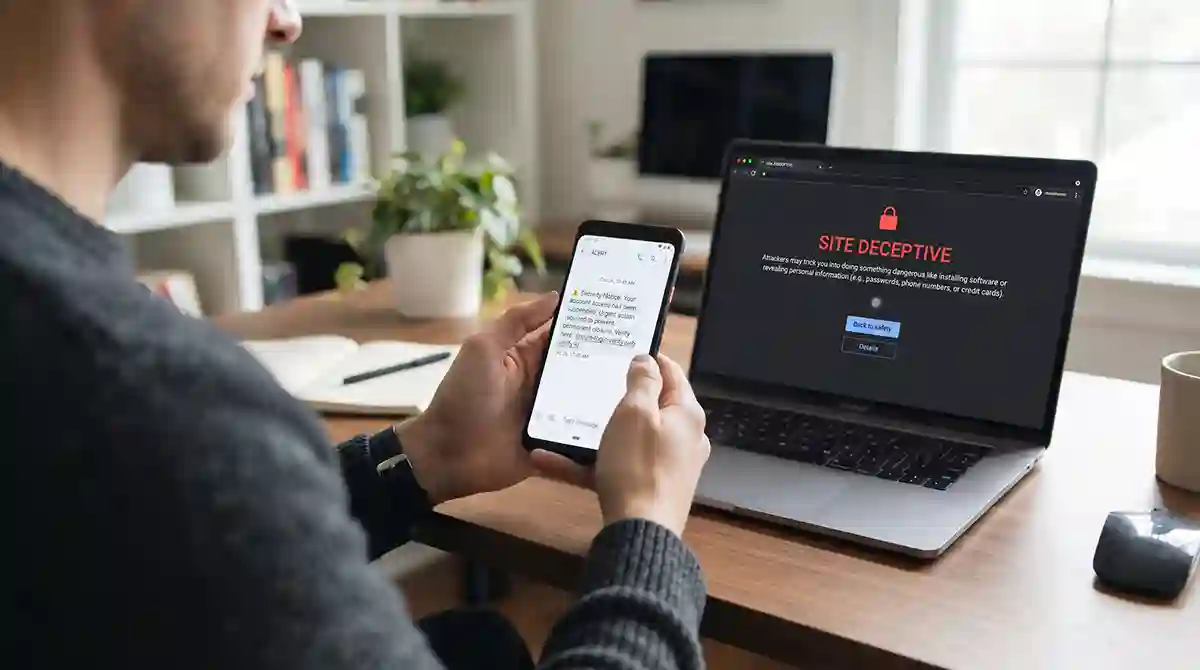
You receive a text message saying your bank account will be blocked unless you verify your details immediately. The message includes the bank’s name, a warning sign, and a link that looks official. You might feel worried and click the link without thinking twice. Here you’ll know how to identify and avoid fake text messages and phishing scams.
A few minutes later, you realise something is wrong. The website was fake, and you may have shared your banking details with a scammer.
This is how many phishing scams begin. Criminals send messages that look like they come from banks, delivery companies, government departments, mobile networks, and even people you know. Their goal is to make you act quickly so you share information, transfer money, or open a dangerous link.
These scams are not limited to email. They can arrive through ordinary SMS messages, WhatsApp, social media, and other messaging apps.
The good news is that you can protect yourself by learning how to recognise suspicious messages and verify them safely. This guide explains common warning signs, practical ways to check messages, and what to do if you have already clicked a suspicious link.
1. Understand What Phishing and Smishing Mean
Phishing is a type of online scam in which criminals pretend to be a trusted person or organisation to steal sensitive information.
They may try to collect:
- Email addresses and passwords
- Bank account details
- Debit or credit card information
- ATM PINs and banking passwords
- One-time passwords (OTPs) and verification codes
- National identity information
- Personal details that can be used for identity theft
When scammers use text messages to carry out phishing attacks, the technique is commonly called smishing, a combination of SMS and phishing.
For example, you may receive a message claiming that your bank account has been temporarily restricted. It asks you to click a link and confirm your account details. The link opens a fake website designed to look like your bank’s real website.
If you enter your information, the scammers may use it to access your account or attempt fraudulent transactions.
Phishing can also happen through WhatsApp messages, emails, social media messages, and fake customer-support conversations. The platform may change, but the basic trick remains the same: make you trust the sender and act before you investigate.
2. Recognise the Most Common Types of Fake Text Messages
Scammers often copy the language and branding of legitimate organisations. Some messages are poorly written, while others look professional and convincing.
Here are common examples you should learn to recognise.
Fake Bank Security Alerts
You might receive a message claiming that someone has attempted to access your bank account or that your debit card has been blocked.
The message may say:
“Your account has been restricted due to suspicious activity. Verify your details immediately to restore access.”
It may include a link to a fake banking website.
Never enter your banking password, PIN, or OTP through a link received in an unexpected message. If you are concerned about your account, open your bank’s official app or contact its customer-support number using a trusted source.
Fake Parcel Delivery Messages
Another common scam involves delivery notifications.
You may receive a message claiming that a parcel could not be delivered because your address is incomplete or a small delivery fee is pending.
The message asks you to click a link to update your address or pay the outstanding amount.
If you are not expecting a parcel, treat the message with extra caution. Even if you are expecting a delivery, check its status through the courier’s official website or app instead of using the link in the message.
Fake Government or Tax Messages
Scammers may pretend to represent a government department or public authority. They might claim that you have an unpaid fine, a pending refund, or an incomplete registration.
For example, a message may say that your tax refund is ready and ask you to provide bank details to receive the payment.
These messages can be especially convincing when they use familiar government names, logos, or official-looking language.
Do not share personal information or make payments through an unexpected link. Visit the relevant department’s official website or contact its verified helpline to confirm the claim.
Fake Prize and Giveaway Messages
Some messages tell you that you have won a smartphone, cash prize, shopping voucher, or lottery.
The sender may ask you to pay a small processing fee or provide personal details before receiving the prize.
Be careful. If you never entered a competition, there is no good reason to trust a message claiming that you have won it.
A prize that requires you to pay an unexpected fee or share sensitive banking information is a major warning sign.
Fake Mobile Network and SIM Messages
You may receive a message claiming that your SIM card will be blocked unless you update your information.
Other messages may offer free internet packages, balance rewards, or special mobile offers through unfamiliar links.
Do not provide your identity information or verification codes just because a message uses the name of a mobile network operator. Check promotions and account-related notices through the operator’s official app, website, or customer service.
Fake WhatsApp and Family Emergency Messages
Not every scam comes from an unknown number. Criminals may pretend to be a family member, friend, or colleague.
A message might say:
“I have lost my phone. Please save this new number and send me some money urgently.”
Another scammer may impersonate a relative and claim to be in an emergency.
Before sending money, call the person using their previously saved number or another trusted contact method. Do not rely only on the new number or the story in the message.
3. Look for These Warning Signs Before Trusting a Message
You do not need technical knowledge to recognise many phishing attempts. Pay attention to the details and ask yourself whether the message makes sense.
The Message Creates Urgency
Scammers want you to react quickly.
They may use phrases such as:
- Your account will be blocked today.
- Your payment must be completed immediately.
- Your SIM card will be suspended.
- Your package will be returned within 24 hours.
- Your account has been compromised. Verify now.
Urgency is a common way to stop people from thinking carefully.
A genuine account problem should be checked through the organisation’s official channels, not through a suspicious link.
The Sender Is Unknown or Unexpected
Be cautious when a message arrives from an unfamiliar number or email address.
However, an unknown number does not automatically mean a scam, and a familiar-looking sender does not guarantee that a message is genuine. Scammers can sometimes manipulate sender information or impersonate legitimate organisations.
Treat the content and request as important clues, not just the sender’s name.
The Link Looks Suspicious
A fake website may use a web address that looks similar to a genuine one.
For example, a scammer might use a domain with an extra word, a spelling change, or a different ending to imitate a bank or service.
Read the actual website address carefully. Do not assume that a link is safe because it contains a familiar company name or logo.
If you are unsure, do not open it. Visit the organisation’s official website by typing its known address into your browser or using its official app.
The Message Requests Sensitive Information
Unexpected requests for passwords, PINs, card details, or OTPs are serious warning signs.
Never share these details in response to an unsolicited message. A legitimate organisation should not need you to reveal your account password or OTP to an unknown person through a text conversation.
The Message Contains Unusual Language
Poor grammar, spelling mistakes, strange formatting, and generic greetings can indicate a scam.
However, do not rely on spelling mistakes alone. Modern phishing messages can be written in clear English or another language and may look almost identical to genuine communications.
The Offer Seems Too Good to Be True
Messages promising free cash, expensive gifts, guaranteed profits, or unbelievable discounts deserve extra attention.
Scammers use attractive offers to make people ignore normal safety checks.
If you cannot independently confirm an offer through the organisation’s official channels, do not provide your details or make a payment.
4. Check a Suspicious Link Without Opening It
One of the safest habits is to avoid opening unexpected links in text messages.
If you receive a suspicious message, you can examine the link without visiting the website.
On a computer, you can sometimes move your mouse pointer over a link to see its destination in the browser or email application. Do not click it.
On a smartphone, avoid tapping the link just to preview it. Some messaging apps offer a link-preview option, but you should not depend on previews as proof that a website is safe.
Instead, consider these checks:
- Look carefully at the domain name.
- Watch for misspellings or additional words.
- Be cautious of shortened links that hide the destination.
- Do not trust a website just because it displays a company logo.
- Open the organisation’s official app or manually enter its known website address.
Remember that HTTPS and the padlock symbol only indicate that a connection is encrypted. They do not prove that the website belongs to a genuine company. Scam websites can also use HTTPS.
If you cannot verify a link, do not open it.
5. Never Share OTPs, PINs, or Banking Passwords
This is one of the most important rules for protecting your money.
An OTP is a temporary verification code used to confirm certain transactions or account activities. Scammers may try to convince you to share it by claiming that they are from your bank, mobile network, or customer-support department.
They may even call you immediately after sending a fake security message.
Never share an OTP, ATM PIN, banking password, or other confidential authentication code with someone who contacts you unexpectedly.
Be particularly careful if someone asks you to:
- Read an OTP aloud over the phone.
- Send a verification code through WhatsApp.
- Share your ATM PIN to unblock a card.
- Install an unfamiliar application for technical support.
- Approve a transaction that you did not initiate.
If you receive an OTP for a transaction you did not start, do not share it or approve anything. Contact your bank through its official channel and check your account activity.
6. Verify Messages Through Official Channels
You do not have to guess whether every message is genuine. You can verify it independently.
Suppose you receive a text message claiming that your bank account has been blocked.
Instead of clicking its link, follow these steps:
- Open your bank’s official mobile application.
- Check whether the account is working normally.
- Look for any security notification inside the app.
- If you still have concerns, contact the bank using the phone number printed on your card or published on its official website.
- Ask whether the message is genuine.
Use the same method for delivery companies, mobile network operators, government departments, and online services.
Do not call a phone number provided in the suspicious message. Do not use its link to reach customer support.
For Google account security alerts, you can also visit your Google Account directly and review recent security activity. Our guide on How to Recover Your Google Account Without Losing Access to Important Services explains useful account recovery and security steps.
The basic rule is simple: verify a message through a channel you already trust, not through the contact details supplied by the person who sent it.
7. How to Protect Your Phone From Phishing Scams
You can reduce your risk by changing a few everyday phone habits.
Keep Your Phone and Apps Updated
Install security updates for your phone’s operating system and regularly update your messaging apps and browser.
Updates can fix security weaknesses and improve built-in protection against harmful websites and applications.
On Android, check for system updates in your phone’s Settings. The exact menu name depends on the manufacturer.
On an iPhone, open Settings, select General, and check Software Update.
Use Built-In Spam Protection
Many Android phones and messaging applications include tools to identify, filter, or report suspicious messages.
On supported Android devices, Google Messages may display spam warnings and allow you to report unwanted messages. The exact options depend on your device, app, and region.
On an iPhone, you can use the available message-filtering and reporting options in the Messages app.
These tools can reduce unwanted messages, but they cannot identify every scam. Always check suspicious requests yourself.
Use Strong and Unique Passwords
Avoid using the same password for your email, banking, social media, and shopping accounts.
If a scammer steals one password, reusing it can put several accounts at risk.
Use a password manager to create and store unique passwords. This also makes it easier to avoid simple passwords based on birthdays, names, or phone numbers.
Enable Two-Factor Authentication
Two-factor authentication adds another security step when signing in to an account.
Depending on the service, you may be able to use an authenticator app, a security key, or another supported verification method.
It does not make an account impossible to hack, but it can provide an extra layer of protection if someone obtains your password.
Never approve an unexpected login request or share a verification code with someone who contacts you.
Be Careful About What You Share Online
Scammers may use information available on social media to make their messages more believable.
For example, they may know your name, workplace, family members, birthday, or the name of a company you recently contacted.
Avoid making sensitive personal information publicly available. Review your social media privacy settings and think carefully before sharing details that could help someone impersonate you.
8. What to Do If You Have Already Clicked a Suspicious Link
Do not panic if you accidentally click a suspicious link. The next steps depend on what happened after you opened it.
Simply opening a webpage does not automatically mean that your accounts or phone have been compromised. However, you should take the situation seriously, especially if you entered information, downloaded a file, or approved a request.
If You Only Opened the Link
Close the webpage immediately.
Do not enter any information, download files, allow notifications, or install applications.
If the website attempted to download something automatically, check your phone’s downloads and remove any suspicious file you did not intend to download.
Update your phone and browser, and use the available security scanning tools if you suspect a harmful download.
If You Entered Your Password
Change the password immediately using the service’s official website or application.
If you reused that password elsewhere, change it on those accounts too.
For example, if you entered your Gmail password on a fake website, open your Google Account directly, change the password, and review recent security activity.
Sign out of unfamiliar sessions, check recovery phone numbers and email addresses, and enable two-factor authentication.
If you need more help securing Gmail, our guide on How to Stop Spam Emails in Gmail and Keep Your Inbox Clean covers useful steps for managing suspicious messages and improving inbox security.
If You Shared Banking Information
Contact your bank immediately using its official helpline or app.
Explain what happened and ask the bank to take the necessary security measures. Depending on the information exposed, this may include blocking a card, restricting transactions, changing credentials, or investigating unauthorised activity.
Check your recent transactions and report anything you do not recognise.
Do not wait for money to disappear before contacting the bank.
If You Shared an OTP or Approved a Transaction
Contact your bank or the relevant service provider immediately.
Explain which code you shared or which transaction you approved. Ask them to check for suspicious activity and take appropriate action.
If money has been transferred without your permission, report it as soon as possible and keep the transaction details and complaint reference.
If You Installed an Unknown Application
Disconnect the phone from the internet if you suspect the application is actively misusing your device or accessing your information.
Remove the suspicious application if possible. On Android, review its permissions and run a security scan using Google Play Protect or another trusted security tool.
On an iPhone, review installed profiles and device-management settings if you were instructed to install anything unusual.
If the application had access to banking, messages, or other sensitive information, contact the relevant service providers and change exposed passwords from a separate, trusted device.
9. How to Report and Block Fake Text Messages
Reporting suspicious messages can help messaging platforms, mobile operators, and relevant authorities identify scams.
First, use the reporting option in your messaging application, if available. You can also block the sender after reporting the message.
If the message claims to come from a bank, contact the bank through its official channel and report the impersonation.
In Pakistan, you can contact your mobile network operator about fraudulent or unwanted SMS messages. For suspected cybercrime or online financial fraud, check the current complaint and reporting channels of the relevant Pakistani authorities, including the National Cyber Crime Investigation Agency (NCCIA). Use official government websites to confirm the correct reporting procedure.
If you have lost money, preserve useful evidence such as:
- Screenshots of the message and conversation.
- The sender’s phone number or account details.
- The suspicious website address.
- Transaction receipts and reference numbers.
- Dates and times of calls or messages.
- Any complaint reference provided by your bank or service provider.
Do not delete important evidence before making a report.
You can also read the Federal Trade Commission’s guide on recognising and reporting spam text messages. Its reporting options are designed for US users, so use your local mobile operator and relevant authorities if you are in Pakistan.
10. Real-Life Examples: How to Respond to Suspicious Messages
Understanding the warning signs becomes easier when you apply them to everyday situations.
Example 1: Your bank account will be blocked
You receive a message claiming that your bank account will be blocked within two hours unless you verify your details.
What should you do?
Do not click the link. Open your bank’s official app or call its verified helpline. If there is a genuine issue, the bank can explain it through its official channel.
Example 2: You have won a cash prize
A message says you have won Rs. 100,000 in a lucky draw. It asks you to pay Rs. 1,500 as a processing fee.
What should you do?
Do not send money. Check whether you actually entered the competition and verify the result through the organiser’s official website. An unexpected prize message that demands payment is a major warning sign.
Example 3: A relative asks for urgent money
You receive a WhatsApp message from a number claiming to be your brother. The sender says they have lost their phone and urgently need money.
What should you do?
Call your brother on his old, saved number. If you cannot reach him, contact another family member who can verify the situation. Do not transfer money based only on the new number’s messages.
Example 4: A delivery company asks for a small payment
You receive an SMS saying your parcel is waiting because a small delivery fee is unpaid.
What should you do?
Check the parcel status through the courier’s official app or website. Do not enter card details on the link in the message, even if the amount requested seems very small.
Frequently Asked Questions
Can a text message hack my phone?
A suspicious message can lead you to a harmful website or trick you into downloading malicious software or sharing sensitive information. Simply receiving a text message does not normally mean your phone has been hacked. Avoid suspicious links and attachments, and keep your device updated.
How can I tell if a message from my bank is real?
Do not rely only on the sender’s name or logo. Check your account through the bank’s official app or contact its verified helpline. Never share your password, PIN, or OTP in response to an unexpected message.
Should I reply STOP to a suspicious text message?
Do not reply to an unknown or suspicious sender just to ask them to stop. Your response may confirm that your number is active. Use the messaging app’s spam-reporting and blocking options instead. Only use STOP when you have independently confirmed that the sender is a legitimate service and you want to unsubscribe.
Is a website safe if it has HTTPS?
No. HTTPS encrypts the connection between your browser and the website, but it does not prove that the website is genuine. Scammers can also create fake websites with HTTPS.
What should I do if someone has my OTP?
Contact the relevant bank or service provider immediately. Explain what happened, check for unauthorised activity, and ask them to secure your account. Change exposed passwords and review recent login activity.
Can scammers use my phone number to steal money?
A phone number alone does not automatically give someone access to your bank account. However, scammers may combine it with other personal information to impersonate you, target your accounts, or attempt account recovery fraud. Protect your OTPs, passwords, and identity information.
Fake text messages and phishing scams work because they make people feel worried, excited, or pressured. A message may look like it comes from your bank, a government department, a delivery company, or someone you know. That does not make it genuine.
The safest habit is to stop and verify before taking action. Do not open unexpected links, share OTPs, enter banking details, or transfer money because a message tells you to act immediately.
If something looks suspicious, contact the organisation or person through a number, website, or app you already trust. And if you have already shared sensitive information, contact the relevant bank or service provider without delay.
A few seconds of checking can protect your money, accounts, and personal information.